
The best Minecraft visual mods for recording videos

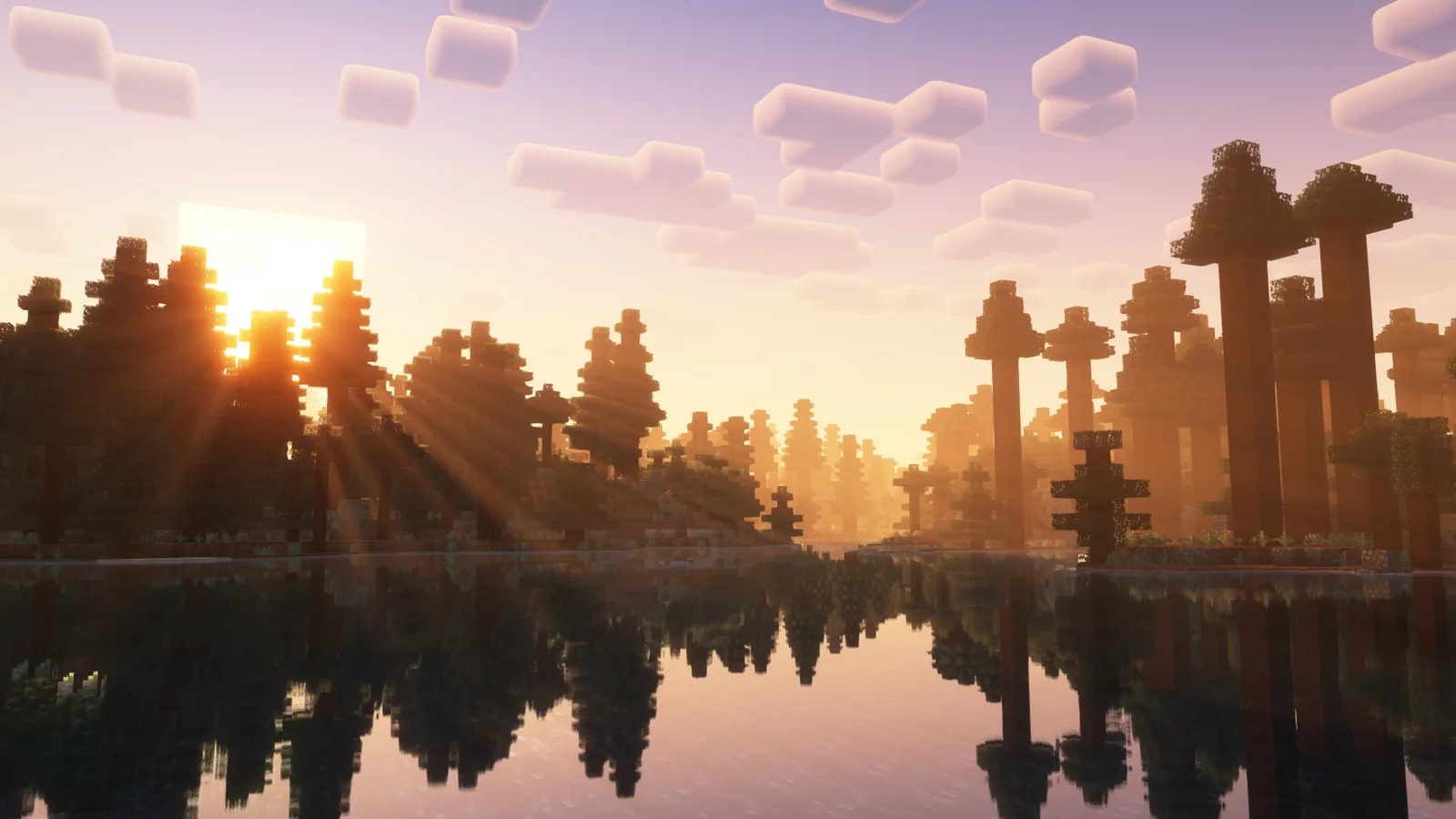
If you record Minecraft, the mods that change your footage the most are Sodium with Iris, a shader such as Complementary, Distant Horizons and Flashback. After those, Fresh Animations, Physics Mod and six smaller mods make mobs, weather, light and water look better on screen. They are all free and have a 26.3 version.
We ranked them for the video, not for playing: the ones at the top show in any shot, and the ones further down shine in specific scenes like a cave, a storm or a boat trip. Download counts are Modrinth's as of November 16, 2026.
Before you start, install Fabric. Flashback, Wakes and Falling Leaves only exist for that loader, and Sodium recommends it. Leave OptiFine out, since it clashes with many of these mods. None of them work on Bedrock.
1. Sodium and Iris
Sodium replaces Minecraft's rendering engine to get more FPS and remove stutter without changing how the game looks. Iris goes on top and loads shaders, including almost every pack made for OptiFine. Together they have over 440 million downloads on Modrinth.
They come as a pair because either one alone falls short for recording: Iris lets you run a shader and Sodium keeps the game at 60 FPS with it. They work on Fabric, NeoForge and Quilt.
2. Complementary Shaders
Of all the shaders Iris can load, Complementary Shaders is among the most downloaded, at 73 million, and one of the best at keeping Minecraft's style. It comes with two styles: Reimagined, which keeps the game's look, and Unbound, which leans realistic.
It is the mod that changes a thumbnail the most, because it redoes the light, the sky and the water, like the lake in this article's cover. It has quality profiles from Potato to Ultra. If your PC cannot hold Ultra at 60 FPS, record one profile lower: viewers notice stutter more than a lower preset.
3. Distant Horizons
Distant Horizons draws far terrain with simplified versions of the chunks, so you can see 256 chunks or more without your FPS collapsing. In one of the screenshots on its page, the game is set to 8 chunks and the mod to 512.
For a video, that means aerial shots and landscapes no longer fade into fog a few blocks away. The same file works on Fabric and NeoForge. There is one thing to check with shaders: since version 2.1 it works with Iris 1.7 or later, but only with shaders built for Distant Horizons, so look at your shader's page before you record.
4. Flashback
Flashback records your session in the background while you play. Afterwards you play it back with a free camera, place keyframes and the mod draws the path between them. It can orbit a point, follow a player or a mob, make timelapses and freeze the world while the camera keeps moving.
What makes it so handy is that it exports the video itself, as MP4, WebM, GIF or PNG sequences, with the game audio and without opening OBS. And since it stores the game's data rather than frames, recording costs fewer FPS than screen capture. It only runs on Fabric, from 1.21 on. If you play an older version, the alternative is ReplayMod, which goes back to 1.7.10 with fewer camera options.
5. Fresh Animations
Fresh Animations is a resource pack that redoes the animations of almost every mob, from villagers to zombies and animals, so they move in a more dynamic, believable way. Its tagline is making the game look like the trailers, and in a mob close-up you see the difference right away.
To run it you need two mods, Entity Model Features and Entity Texture Features, which do the job OptiFine used to. Packs that only change textures usually get along with it. Packs that change mob models do not, because they override its animations.
6. Physics Mod
Physics Mod turns mobs into ragdolls when they die, shatters blocks, makes structures collapse and gives dropped items physics. It also lets you change gravity.
This is the mod for your video's climax: an explosion or a fight with Physics Mod is worth slowing down in the edit. The free version has all of the above, and the extra simulations, like ocean, smoke and cloth, are in the Pro version. It eats more performance than anything else on this list, so turn it on only for the shots that need it.
7. Particle Rain
Particle Rain swaps the game's rain and snow for particles. Rain falls at an angle with the wind and gets denser in storms, and snow spins slowly as it falls. It also adds sandstorms in deserts, with dust the color of the block underneath, and fog in wet biomes.
You can tune all of it from its menu with the /particlerain command. If your FPS drops while recording a rainy day, particle density is the first thing to lower.
8. LambDynamicLights
Without mods, a torch in your hand lights nothing. LambDynamicLights makes any item that gives light as a block give it too when a player or mob holds it, and lights up dropped items and burning mobs.
For caves and night scenes it is close to essential, because the light follows your character instead of depending on placed torches. It works on Fabric, NeoForge and Quilt.
9. Wakes
Wakes adds wakes behind boats and anything swimming, and splashes when something falls into the water, bigger the bigger the entity. It supports Iris shaders, though its page lists a few incompatibilities.
In a boat trip or an ocean exploration video, it is what makes the water look like water. It only exists for Fabric.
10. Not Enough Animations
In first person, Minecraft animates things like eating, drinking or holding a map, but in third person you never see those animations. Not Enough Animations adds them, and fixes others such as rowing a boat or crawling.
A cinematic camera always films in third person, so this mod avoids those moments where your character eats without moving their arms. Each animation can be turned on or off on its own, and since it is purely visual it works on any server.
11. Wavey Capes
Wavey Capes stops your cape from being a stiff slab stuck to your back. It draws it as one flexible piece that bends and waves in the wind as you run.
It has several styles, from a full simulation to one that copies the capes in Minecraft Dungeons, and since it is client-side it works on any server. If your character wears a cape in thumbnails or back shots, it shows.
12. Falling Leaves
Falling Leaves makes leaves fall from trees. You can choose which leaf types drop particles and how often, and it works with trees from other mods and with resource packs.
Spruces, pines and jungle trees do not drop leaves by default. If you are filming in one of those forests, turn them on in its settings. It runs on Fabric and needs Cloth Config.
Putting it all together
For a combination that works as a whole, install them in this order and launch the game between steps:
- Fabric with Fabric API.
- Sodium, Iris and Complementary.
- Distant Horizons, if your shader supports it.
- Flashback.
- Fresh Animations with Entity Model Features and Entity Texture Features.
- From 7 to 12, whichever each video calls for.
Once you have the shot, the thumbnail is left. A 3D render of your skin in the same light as the video looks better than a screenshot, and you can build it in the Render Studio.




Start with 15 free Premiere Pro presets
Join the newsletter and they reach your inbox right away: text, zooms, shakes and transitions ready to drag. No plugins, no watermark.

Kial makes Minecraft videos on YouTube (KialMC), edits their own videos and is part of the CreativeStar team.
Their channel: KialMCStuck on a step?
Ask on our Discord.
The team and the community will help you out. And share the result: we love seeing what you make.
Frequently asked questions
For videos, the base is Sodium with Iris and a shader such as Complementary. On top of that, Distant Horizons for long views, Flashback to move the camera, Fresh Animations for livelier mobs and Physics Mod for destruction add the most.
Mixing them is a bad idea, because many visual mods are not compatible with OptiFine. Iris loads almost every OptiFine shader pack and Sodium takes care of performance.
No. Every mod on this list is for Java Edition. Bedrock uses add-ons and resource packs, which are a different system.
With Flashback. It records your session in the background, lets you move a free camera with keyframes and exports the video itself as MP4, WebM, GIF or a PNG sequence.
It depends on the shader and its settings. Complementary has profiles from Potato to Ultra, and Sodium raises your base FPS. For recording, play on lower settings and raise them only for the key shots.