
Minecraft Piston PNG
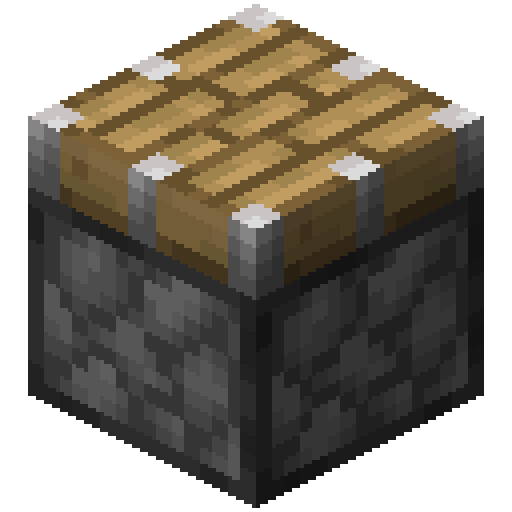
The Piston exactly as it looks in the Minecraft 26.3 inventory, as a transparent PNG. It is the render of the item itself, not a loose texture: what you see in your hand and in chests. In the creative inventory it sits in the “Redstone” tab.
 See every Minecraft icon
Sizes and quality
The Piston render is 128 × 128 pixels, the size the game draws the item at in the inventory. It scales up by whole numbers to 1024 px with no interpolation, so the edges stay sharp.
Open in the icon editor
In the full tool you can add a shadow or shine, animate it as a video or use it for a tiled background, alongside the game’s 1,700+ items.
Open in the icon editorThe Minecraft piston: how it works and what it cannot move
A piston pushes blocks and entities when it gets a redstone signal. It always faces towards you when placed, takes 2 game ticks to extend and can move up to 12 blocks at once. It can be powered from any side except the head. The sticky version also pulls the block back when it retracts.
Not everything moves. Obsidian, for instance, cannot be pushed, and blocks that need support, such as levers or torches, break and drop as items. Carpets and rails are exceptions as long as they still have a valid support. If a block does not meet the requirements, the piston simply will not extend.
Slime and honey blocks are the base of almost every advanced build: when moved, they drag along any blocks touching their faces. They do not stick to each other, so alternating them lets two parts of a machine move separately, and glazed terracotta sticks to neither.
Java has quasi-connectivity: a piston can be powered from the block above it, a legacy behaviour many designs rely on. A calibrated sculk sensor can also tell its sounds apart: strength 11 for extending and 10 for retracting.
Sources: minecraft.wiki/Piston, minecraft.wiki/Block of Netherite
How to get Piston
Crafted on the crafting table in this shape:
Mined with a pickaxe.
Recipe and drops taken from the Minecraft 26.3 data pack.
Other icons people look for

Minecraft 26.3 textures. Minecraft is a trademark of Mojang Studios; CreativeStar is not affiliated with it and the textures are theirs.