
Minecraft Armor Stand PNG
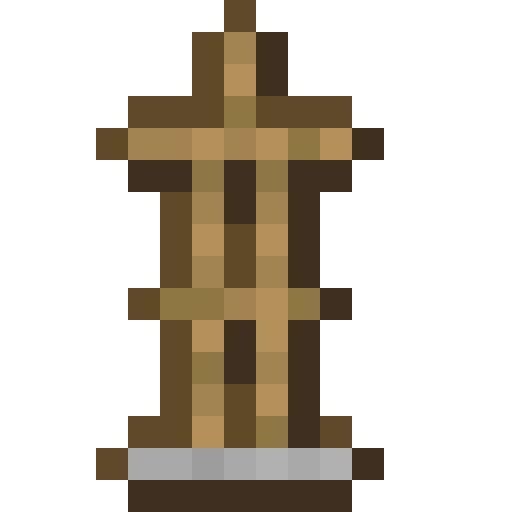
The Armor Stand exactly as it looks in the Minecraft 26.3 inventory, as a transparent PNG. It is the render of the item itself, not a loose texture: what you see in your hand and in chests. In the creative inventory it sits in the “Functional” tab.
 See every Minecraft icon
Sizes and quality
The Armor Stand render is 128 × 128 pixels, the size the game draws the item at in the inventory. It scales up by whole numbers to 1024 px with no interpolation, so the edges stay sharp.
Open in the icon editor
In the full tool you can add a shadow or shine, animate it as a video or use it for a tiled background, alongside the game’s 1,700+ items.
Open in the icon editorMinecraft armor stand: poses and handy tricks
An armor stand is an entity that can wear armour, mob heads, carved pumpkins and elytra. It is mostly used to store and show off gear: click it with a piece of armour and it goes into the right slot, swapping with whatever was there. Two quick hits break it, and it drops everything it was wearing.
The editions differ a lot. In Bedrock it has arms by default, can hold items and changes pose when you sneak and use it or give it a redstone signal; there are 13 poses. In Java its arms stay hidden unless you enable them with commands, for example /summon minecraft:armor_stand ~ ~ ~ {ShowArms:1}, and commands also change its pose, size or base plate.
Even though it never moves by itself, it counts as a living entity: pistons and water push it, a fishing rod can pull it and effects apply to it. Some enchantments still work while it wears them: in Java, Thorns armour hurts you when you hit it, and leather boots keep it standing on powder snow.
Taiga village armouries come with two already placed. In Bedrock, naming one Dinnerbone or Grumm turns it upside down.
Sources: minecraft.wiki/Armor Stand
How to get Armor Stand
Crafted on the crafting table in this shape:
Recipe and drops taken from the Minecraft 26.3 data pack.
Armor Stand stats
- Stacks to
- 16
Other icons people look for

Minecraft 26.3 textures. Minecraft is a trademark of Mojang Studios; CreativeStar is not affiliated with it and the textures are theirs.