
Minecraft Jukebox PNG
The Jukebox exactly as it looks in the Minecraft 26.3 inventory, as a transparent PNG. It is the render of the item itself, not a loose texture: what you see in your hand and in chests. In the creative inventory it sits in the “Functional” tab.
 See every Minecraft icon
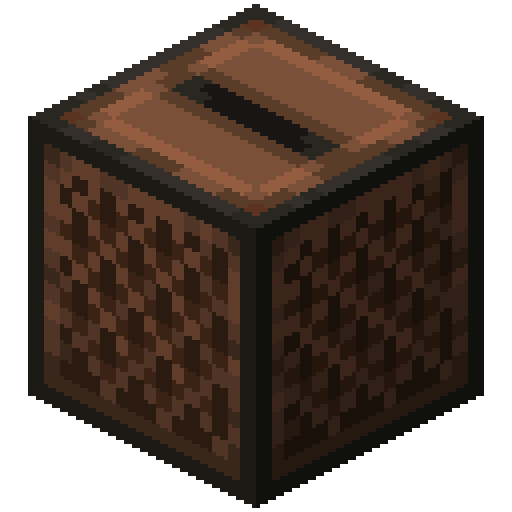
Sizes and quality
The Jukebox render is 128 × 128 pixels, the size the game draws the item at in the inventory. It scales up by whole numbers to 1024 px with no interpolation, so the edges stay sharp.
Open in the icon editor
In the full tool you can add a shadow or shine, animate it as a video or use it for a tiled background, alongside the game’s 1,700+ items.
Open in the icon editorMinecraft jukebox: recipe, music and redstone
The jukebox plays music discs. It is crafted from eight planks around a diamond, and any tool breaks it, although an axe is fastest; breaking it also drops whatever disc was inside.
Insert a disc by using it on the jukebox and take it out by using the jukebox again. The music carries up to 64 blocks, and each disc plays only once before it has to be ejected and put back in. Hoppers and droppers can insert discs too.
While it plays, it has two curious effects. Tamed parrots and allays dance within 3 blocks. And if you give an amethyst shard to a dancing allay, it splits in two, with a five minute cooldown before it can happen again.
For redstone, it gives off a signal of strength 15 while a disc plays, and a comparator gives a different signal depending on which disc is inside. Since it disables adjacent hoppers while playing, a hopper underneath lets you build a jukebox that swaps discs on its own at the end of every song.
Sources: minecraft.wiki/Jukebox
How to get Jukebox
Crafted on the crafting table in this shape:
Mined with an axe.
Recipe and drops taken from the Minecraft 26.3 data pack.
Other icons people look for


Minecraft 26.3 textures. Minecraft is a trademark of Mojang Studios; CreativeStar is not affiliated with it and the textures are theirs.