
Minecraft Scaffolding PNG
The Scaffolding exactly as it looks in the Minecraft 26.3 inventory, as a transparent PNG. It is the render of the item itself, not a loose texture: what you see in your hand and in chests. In the creative inventory it sits in the “Functional” tab.
 See every Minecraft icon
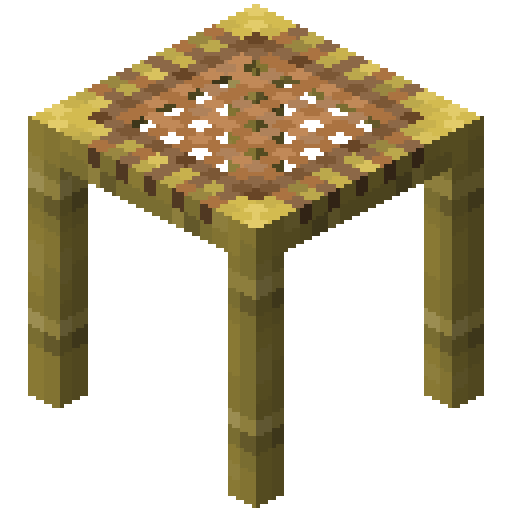
Sizes and quality
The Scaffolding render is 128 × 128 pixels, the size the game draws the item at in the inventory. It scales up by whole numbers to 1024 px with no interpolation, so the edges stay sharp.
Open in the icon editor
In the full tool you can add a shadow or shine, animate it as a video or use it for a tiled background, alongside the game’s 1,700+ items.
Open in the icon editorScaffolding in Minecraft: how to place it and take it down
Scaffolding is the go-to block for building high up. You climb inside it: jump to go up and sneak to go down. Its top is a stable platform you can stand on, and landing on it while sneaking resets your fall, which prevents fall damage.
Placing it works differently from any other block. Use scaffolding on the top face of another piece and it extends forward in the direction you face; use it on a side face and it is added to the top of the column. While sneaking it places like a normal block. That is how towers and bridges go up so quickly.
It has a reach limit. It only holds up to 6 blocks out from a column resting on the ground; place it further and the piece drops like a gravity block until it finds support.
The best part comes when the build is done: break the bottom piece and every piece above it falls, as with bamboo, so you collect them all at once. It breaks instantly by hand. In Bedrock it cannot sit next to lava or fire, which destroy it, and in Java fire burns it too.
Sources: minecraft.wiki/Scaffolding
How to get Scaffolding
Crafted on the crafting table in this shape:
Recipe and drops taken from the Minecraft 26.3 data pack.
Other icons people look for

Minecraft 26.3 textures. Minecraft is a trademark of Mojang Studios; CreativeStar is not affiliated with it and the textures are theirs.